
MLOps Pipelines

Bringing Clarity to Complex, Code-Heavy AI Workflows in ML and GenAI Orchestration Platform

UX/UI

OBSERVABILITY

SAAS

ML & gen AI

MLOps Pipelines

Bringing Clarity to Complex, Code-Heavy AI Workflows in ML and GenAI Orchestration Platform

MLOps Pipelines

Bringing Clarity to Complex, Code-Heavy AI Workflows in ML and GenAI Orchestration Platform

UX/UI

OBSERVABILITY

SAAS

ML & gen AI

UX/UI

OBSERVABILITY

SAAS

ML & GENAI

[01]

INTRODUCTION

[01]

INTRODUCTION

[01]

INTRODUCTION

Overview

Overview

Overview

CLIENT

Iguazio (acquired by McKinsey) provides AI platforms that enable enterprises to develop, deploy and manage ML and GenAI applications.

CLIENT

Iguazio (acquired by McKinsey) provides AI platforms that enable enterprises to develop, deploy and manage ML and GenAI applications.

CLIENT

Iguazio (acquired by McKinsey) provides AI platforms that enable enterprises to develop, deploy and manage ML and GenAI applications.

PLATFORM

MLRun - an MLOps B2B SaaS platform building tools for AI/ML observability and operations.

PLATFORM

MLRun - an MLOps B2B SaaS platform building tools for AI/ML observability and operations.

PLATFORM

MLRun - an MLOps B2B SaaS platform building tools for AI/ML observability and operations.

MY ROLE

Lead Product Designer on behalf of Kido

MY ROLE

Lead Product Designer on behalf of Kido

MY ROLE

Lead Product Designer on behalf of Kido

TIMELINE

Q3 - Q4 2025

TIMELINE

Q3 - Q4 2025

TIMELINE

Q3 - Q4 2025

The Problem

The Problem

The Problem

Complex Pipelines, Limited Visibility

Complex Pipelines, Limited Visibility

Complex Pipelines, Limited Visibility

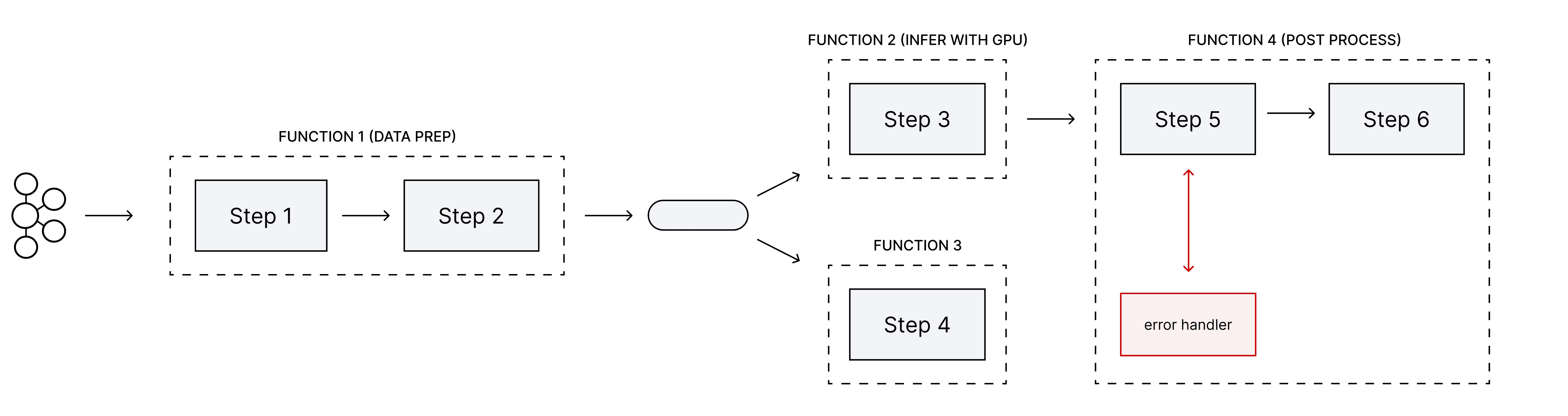
Real-time MLOps pipelines are complex workflows spanning data transformations, model serving, routing, and error handling across many code files. Lack of observability forces teams to trace interactions manually, slowing decisions, hindering collaboration, and making pipelines hard to maintain and scale.
Real-time MLOps pipelines are complex workflows spanning data transformations, model serving, routing, and error handling across many code files. Lack of observability forces teams to trace interactions manually, slowing decisions, hindering collaboration, and making pipelines hard to maintain and scale.

Real-time MLOps pipelines are complex workflows spanning data transformations, model serving, routing, and error handling across many code files. Lack of observability forces teams to trace interactions manually, slowing decisions, hindering collaboration, and making pipelines hard to maintain and scale.

A short, simplified serving pipeline outlined by the PM at project kickoff.

The Mission

The Mission

The Mission

Transforming Complexity into Clarity

Transforming Complexity into Clarity

Transforming Complexity into Clarity

Our goal was to transform complex pipelines into an interactive, visual, and observable experience - helping teams understand, monitor, and optimize workflows without digging into code.

Our goal was to transform complex pipelines into an interactive, visual, and observable experience - helping teams understand, monitor, and optimize workflows without digging into code.

Our goal was to transform complex pipelines into an interactive, visual, and observable experience - helping teams understand, monitor, and optimize workflows without digging into code.

1

Understand at a glance

Deliver instant clarity across the pipeline, with on-demand access to metrics and configuration.

2

Differentiate & highlight

Clearly distinguish step types and surface the most relevant information for faster interpretation.

3

Handle complex, uniqe cases

Accurately represent branching logic, multi-function nodes, multiple error handlers, and more.

4

Immediate feedback

Deliver real-time alerts and visual cues for issues, reducing downtime and speeding troubleshooting.
1

Understand at a glance

Deliver instant clarity across the pipeline, with on-demand access to metrics and configuration.

2

Differentiate & highlight

Clearly distinguish step types and surface the most relevant information for faster interpretation.

3

Handle complex, uniqe cases

Accurately represent branching logic, multi-function nodes, multiple error handlers, and more.

4

Immediate feedback

Deliver real-time alerts and visual cues for issues, reducing downtime and speeding troubleshooting.

1

Understand at a glance

Deliver instant clarity across the pipeline, with on-demand access to metrics and configuration.

2

Differentiate & highlight

Clearly distinguish step types and surface the most relevant information for faster interpretation.

3

Handle complex, uniqe cases

Accurately represent branching logic, multi-function nodes, multiple error handlers, and more.

4

Immediate feedback

Deliver real-time alerts and visual cues for issues, reducing downtime and speeding troubleshooting.

[02]

RESEARCH

[02]

RESEARCH

[02]

RESEARCH

Understanding the Domain

Understanding the Domain

Understanding the Domain

Navigating Real-Time AI Pipelines

Navigating Real-Time AI Pipelines

Navigating Real-Time AI Pipelines

Before diving into design, we explored the domain to understand how AI pipelines operate in practice - how they are created, executed, monitored, and maintained. We reviewed the full product documentation and watched several related demos to gain a comprehensive understanding of the processes and workflows involved.

Before diving into design, we explored the domain to understand how AI pipelines operate in practice - how they are created, executed, monitored, and maintained. We reviewed the full product documentation and watched several related demos to gain a comprehensive understanding of the processes and workflows involved.

Before diving into design, we explored the domain to understand how AI pipelines operate in practice - how they are created, executed, monitored, and maintained. We reviewed the full product documentation and watched several related demos to gain a comprehensive understanding of the processes and workflows involved.

Benchmarking Node-Based Workflows

Benchmarking Node-Based Workflows

Benchmarking Node-Based Workflows

Identifying Common Patterns and Practices

Identifying Common Patterns and Practices

Identifying Common Patterns and Practices

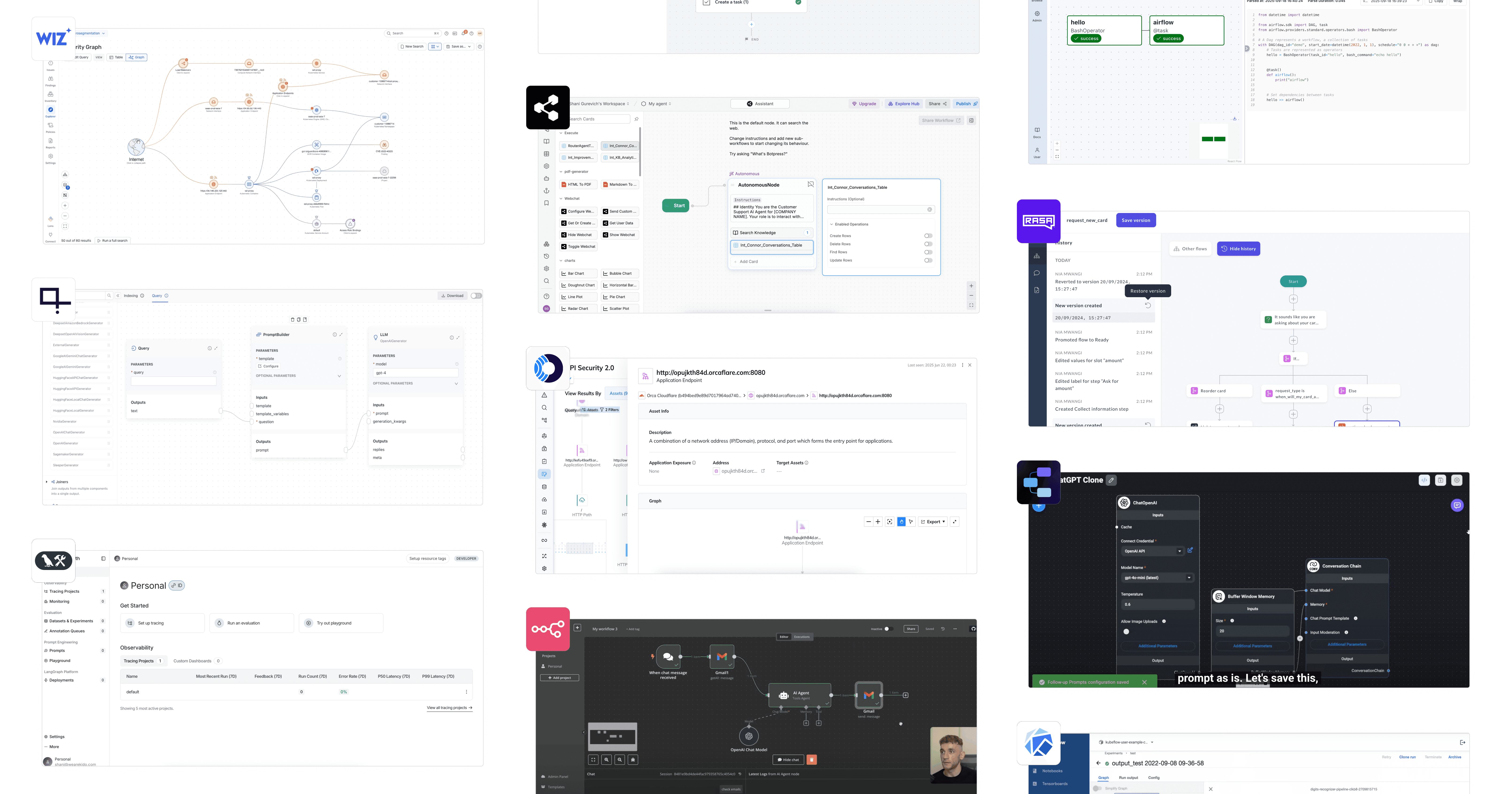
We analyzed various node-based and workflow-driven tools - ranging from data pipeline orchestrators to automation builders and cybersecurity risk maps. Our goal was to identify common patterns in visualizing dependencies, highlighting errors, differentiating node types, and balancing high-level overviews with detailed inspection.
We analyzed various node-based and workflow-driven tools - ranging from data pipeline orchestrators to automation builders and cybersecurity risk maps. Our goal was to identify common patterns in visualizing dependencies, highlighting errors, differentiating node types, and balancing high-level overviews with detailed inspection.

We analyzed various node-based and workflow-driven tools - ranging from data pipeline orchestrators to automation builders and cybersecurity risk maps. Our goal was to identify common patterns in visualizing dependencies, highlighting errors, differentiating node types, and balancing high-level overviews with detailed inspection.

Key Insights

Key Insights

Key Insights

This Research Clarified Several Key Principles:

This Research Clarified Several Key Principles:

This Research Clarified Several Key Principles:

1

Reveal complexity gradually

Show high-level information first, with details available on demand to avoid overwhelming users.

2

Surface relevant metrics

Highlight key metrics at both the graph and step levels, deciding what to feature upfront and what to keep in deeper views.

3

Differentiate step types visually

Use visual cues and a legend to make step types immediately recognizable, supporting faster scanning and comprehension.

4

Flexible, adjustable canvas

Design a workspace that adapts to different workflows and interaction preferences, allowing users to explore pipelines efficiently.

1

Reveal complexity gradually

Show high-level information first, with details available on demand to avoid overwhelming users.

2

Surface relevant metrics

Highlight key metrics at both the graph and step levels, deciding what to feature upfront and what to keep in deeper views.

3

Differentiate step types visually

Use visual cues and a legend to make step types immediately recognizable, supporting faster scanning and comprehension.

4

Flexible, adjustable canvas

Design a workspace that adapts to different workflows and interaction preferences, allowing users to explore pipelines efficiently.

1

Reveal complexity gradually

Show high-level information first, with details available on demand to avoid overwhelming users.

2

Surface relevant metrics

Highlight key metrics at both the graph and step levels, deciding what to feature upfront and what to keep in deeper views.

3

Differentiate step types visually

Use visual cues and a legend to make step types immediately recognizable, supporting faster scanning and comprehension.

4

Flexible, adjustable canvas

Design a workspace that adapts to different workflows and interaction preferences, allowing users to explore pipelines efficiently.

[03]

DESIGN PROCESS

[03]

DESIGN PROCESS

[03]

DESIGN PROCESS

System-First Approch

System-First Approch

System-First Approch

From day one, we built this feature alongside a scalable design system and reusable components, ensuring speed and functionality. This provided predictable behaviors and visual consistency across pipeline views, accelerated iterations and stakeholder reviews, and enabled rapid implementation of changes.

From day one, we built this feature alongside a scalable design system and reusable components, ensuring speed and functionality. This provided predictable behaviors and visual consistency across pipeline views, accelerated iterations and stakeholder reviews, and enabled rapid implementation of changes.

From day one, we built this feature alongside a scalable design system and reusable components, ensuring speed and functionality. This provided predictable behaviors and visual consistency across pipeline views, accelerated iterations and stakeholder reviews, and enabled rapid implementation of changes.

Interactive, Contextual Pipeline Canvas

Interactive, Contextual Pipeline Canvas

Interactive, Contextual Pipeline Canvas

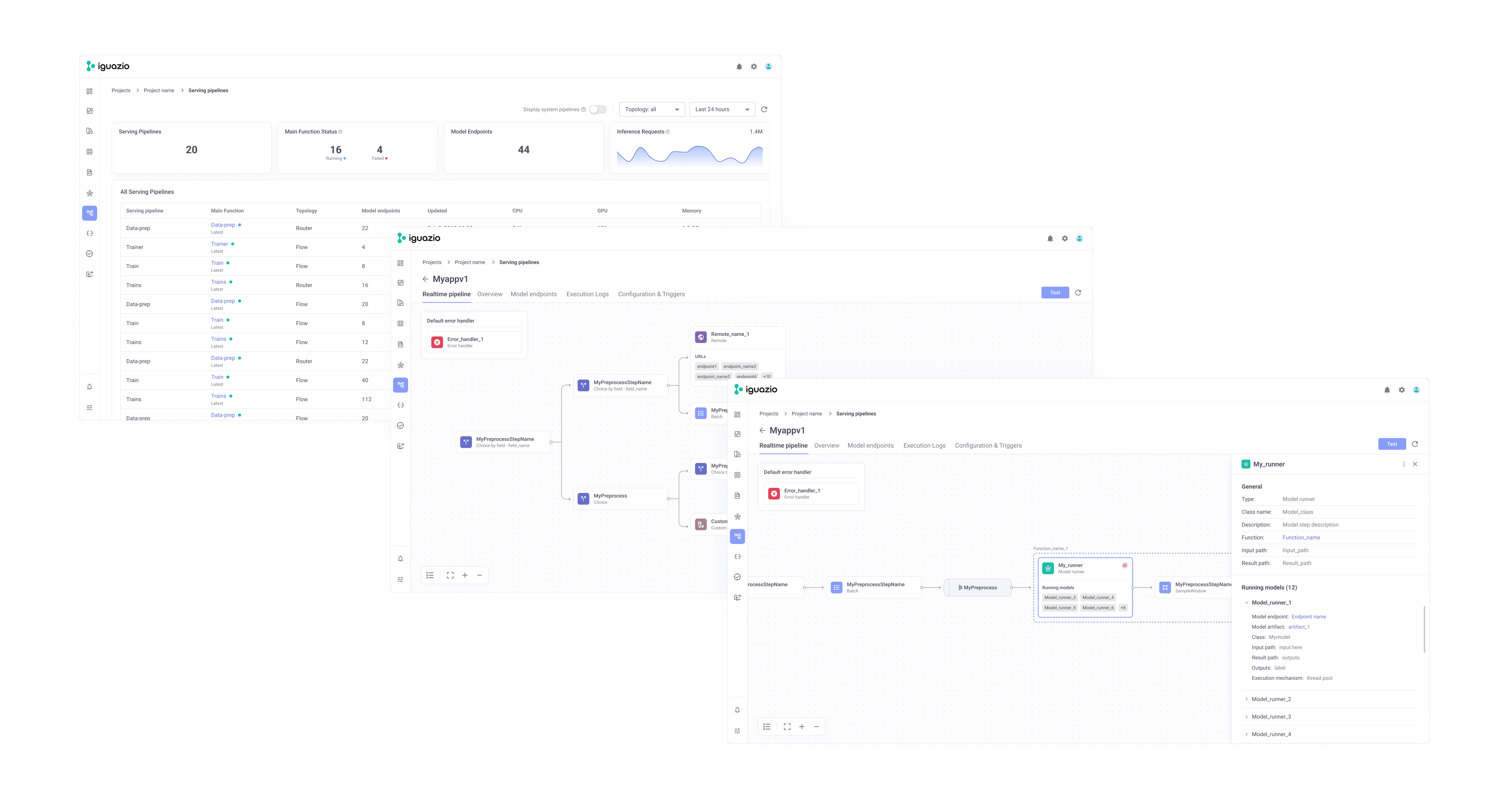
We created an interactive pipeline canvas that balances overview and detail. Users can see the full workflow at a glance, drill into steps for metrics, and navigate complex branching logic without losing context.

We created an interactive pipeline canvas that balances overview and detail. Users can see the full workflow at a glance, drill into steps for metrics, and navigate complex branching logic without losing context.

We created an interactive pipeline canvas that balances overview and detail. Users can see the full workflow at a glance, drill into steps for metrics, and navigate complex branching logic without losing context.

We designed a flexible, interactive pipeline visualization that gives users a complete view of their workflows while keeping critical details within reach. Users can drill into steps for metrics and configurations and navigate complex branching without losing context.

We designed a flexible, interactive pipeline visualization that gives users a complete view of their workflows while keeping critical details within reach. Users can drill into steps for metrics and configurations and navigate complex branching without losing context.

We designed a flexible, interactive pipeline visualization that gives users a complete view of their workflows while keeping critical details within reach. Users can drill into steps for metrics and configurations and navigate complex branching without losing context.

Distinct Node Visualization

Distinct Node Visualization

Distinct Node Visualization

We color-coded node types by category for quick scanning and tested accent combinations from Iguazio’s design system to ensure they remained distinct and accessible for users with common color vision deficiencies, maintaining clarity without compromising visual distinction.
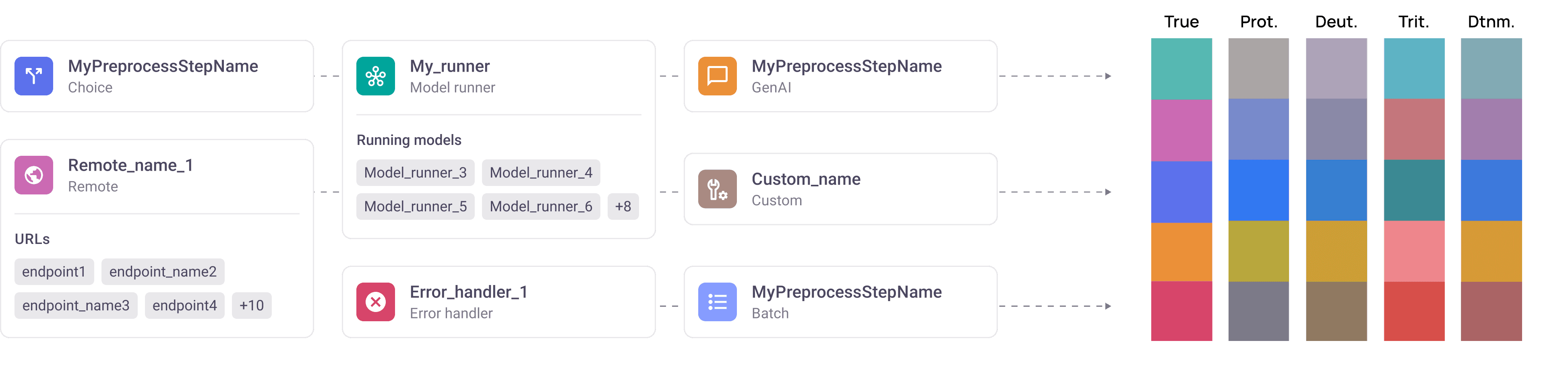
Right columns illustrate how accent colors appear to users with common color vision deficiencies.

[05]

OUTCOME & IMPACT

[05]

OUTCOME & IMPACT

[05]

OUTCOME & IMPACT

What We Achieved

What We Achieved

What We Achieved

By transforming code-heavy pipelines into interactive, visual workflows, we helped teams work faster, make better decisions, and enabled less technical members to collaborate and understand pipelines with confidence.

40%

Teams spent about 40% less time interpreting pipelines, enabling quicker decisions.

40%

Teams spent about 40% less time interpreting pipelines, enabling quicker decisions.

40%

Teams spent about 40% less time interpreting pipelines, enabling quicker decisions.

25%

Users caught 25% more pipeline errors before production, thanks to real-time alerts.

25%

Users caught 25% more pipeline errors before production, thanks to real-time alerts.

25%

Users caught 25% more pipeline errors before production, thanks to real-time alerts.

85%

Users reported 85% higher confidence navigating complex, multi-branch pipelines.

85%

Users reported 85% higher confidence navigating complex, multi-branch pipelines.

85%

Users reported 85% higher confidence navigating complex, multi-branch pipelines.

X2

Cross-functional teams aligned twice as fast using the shared visual pipeline view.

X2

Cross-functional teams aligned twice as fast using the shared visual pipeline view.

X2

Cross-functional teams aligned twice as fast using the shared visual pipeline view.

[06]

MORE PROJECTS

[06]

MORE PROJECTS

[06]

MORE PROJECTS

©2026 SHANI GUREVICH. ALL RIGHTS RESERVED.

© 2026 Shani Gurevich. All rights reserved.

© 2026 SHANI GUREVICH. ALL RIGHTS RESERVED.